CipherStash now integrates with Supabase

Today we're launching the CipherStash integration for Supabase.
Developers love Supabase: it’s the open-source managed Postgres platform with an integrated suite of backend services, including Auth, Storage, Edge Functions, Realtime, and more. More than 9 million developers use Supabase to build and scale their applications.
CipherStash is the privacy layer for applications built on Supabase. It encrypts sensitive fields, and lets you search and join encrypted data without decrypting it. Audit logging, key management, and authentication are built in, so you don’t need to build encryption infrastructure from scratch.
With CipherStash, teams can secure sensitive data in Supabase and extend access control to AI agents, not just human users.
I've spent over 15 years searching for this. CipherStash is the first platform I've seen that lets engineering teams ship encryption without trading away the database.

With the Supabase integration, you add field-level encryption to any Supabase project through the encrypted Supabase SDK wrapper. Run npx stash init --supabase to get set up, nominate the columns you want to protect, and keep your queries the same.
- Works with Supabase.js, Prisma Next, Drizzle, or plain SQL through
pg - Integrates with Supabase Auth, Clerk, Okta, and Auth0
- Supports
WHERE,LIKE,ORDER BY,JOIN, andGROUP BYover encrypted columns - Has query overhead typically less than 10ms (see benchmarks)
Built for agents, not just humans
Application security grew up around one kind of user: a human behind a session. Agents break that model. They act on behalf of users, chain tools together, write to logs and traces, and can be steered by untrusted input, all while needing real access to your data to be useful. The tempting shortcut is to hand the agent broad credentials and hope for the best. When IBM studied last year's breaches of AI systems, 97% of the organizations hit lacked proper access controls.
CipherStash moves access control from the perimeter to the data itself. Sensitive values are encrypted in your application before being saved to the database, and they can only be decrypted again by an authorized user. Data remains queryable, while add just milliseconds of overhead.
AI Agents get their own decryption keys, separate from the users who drive them. Access policies that your team defines are embedded in encrypted values, so an agent can only ever see data it is explicitly allowed to read, and every access is logged, so security teams have the tools they need if anything ever goes wrong.
How it works
CipherStash encrypted search is built on the Encrypted Query Language (EQL), which can be installed into any Supabase Database. Like regular Postgres, EQL provides a set of common data types and functions, but is designed for working with encrypted data.
Use EQL types for table columns you want to protect. For example, to create a users table with encrypted email and profile fields:
CREATE TABLE users ( id serial PRIMARY KEY, created_at timestamp, -- sensitive data email eql_v3_text_search, profile eql_v3_json);EQL types are self-describing. Each type name contains the EQL version, underlying data type and optional "modifiers" indicating that encrypted search is available.
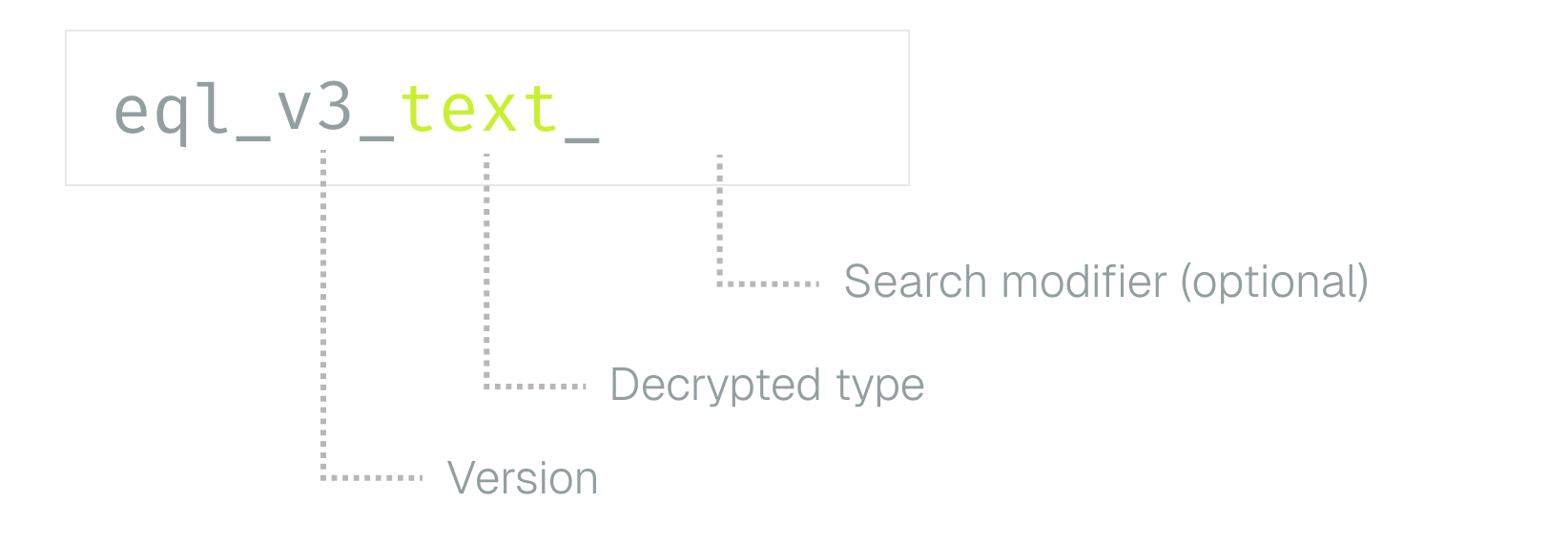
For example:
- Use
eql_v3_date_eqto filter encrypted dates withWHERE - Use
eql_v3_integer_ordto filter and sort encrypted integers withWHEREandORDER BY - Use
eql_v3_text_searchfor full-text search with approximate-LIKEfiltering,WHEREclauses, andORDER BY
Most types also support JOIN, GROUP BY, and UNION queries. The encrypted queries reference has the full list.
Once installed, you can add EQL columns from the Table Editor in the Supabase Dashboard, the same way you'd pick text or int8.
Your database never sees your data
EQL describes how encryption should be used, but it doesn’t actually perform the encryption. For that, @cipherstash/stack to encrypt data in your application before saving it to the database. It comes with plugins for common ORMs and frameworks, including Supabase.js.
Import the encrypted Supabase wrapper from @cipherstash/stack and connect the same way you would with supabase-js:
import { encryptedSupabaseV3 } from '@cipherstash/stack/supabase'// Reads your schema over DATABASE_URL to find the encrypted columnsconst supabase = await encryptedSupabaseV3(supabaseUrl, supabaseKey)Insert a value into an EQL column, and it will be automatically encrypted:
// Insert — the value is encrypted automaticallyawait supabase .from('users') .insert({ email: '[email protected]' })Queries are encrypted too. The search term is encrypted before it leaves your app, and by default the results come back decrypted:
// Query — the search term is encrypted, results are decrypted for youconst { data } = await supabase .from('users') .select() .eq('email', '[email protected]')Same API, same .eq(), .like(), and .order() you use today. The plaintext and the keys never leave your environment, and they never reach us.
FAQ
Can CipherStash ever see my data, or my encryption keys? No, never. Encryption and decryption occur in your application, and keys are derived in your environment. Plaintext and keys never leave your control and never reach CipherStash.
How well does it scale? Latency stays flat as data grows: exact-match lookups hold at ~0.1 ms, and range queries at ~0.5 ms, from 10k to 10M rows.1
What does migration look like? Install EQL on your Supabase database. Choose which columns you want to protect, then set their encryption type. Encrypt values in your app before saving them. You can update columns one at a time.
Do I have to change how I write queries? No. Query encrypted columns with the same Supabase.js calls you use today.
Do I need to run a KMS or a key vault? No. Key management is built in through ZeroKMS. If you want to own the root key, BYOK lets you root it in your own KMS.
Does it work with Supabase Auth and Row-Level Security? Yes. It integrates with Supabase Auth and runs alongside RLS. It complements them; it does not replace them.
I already use Row Level Security (RLS), do I need the CipherStash integration for Supabase? RLS and CipherStash do different things, and they work best when used together. RLS controls which rows someone can see, but the actual data is still unencrypted. If RLS is bypassed, for example through a leaked key, a misconfigured policy, or a compromised database, the plaintext is exposed. CipherStash encrypts the data and stores the keys separately, so even if someone gets around RLS, the data stays safe. Use RLS to control access and CipherStash to keep your data protected.
Is there a free tier? Yes, there’s a free developer tier, so you can build encryption in from day one.
Get started
Get started with the Supabase Integration or run:
npx stash init --supabaseFor more information see the Supabase integration guide, browse the source on GitHub, or come and say hi in Discord.
Measured against a 10-million-row dataset. Methodology and raw results are in our open-source benchmark suite (full report).
↩