Adding CipherStash Stack to a Next.js + Supabase app

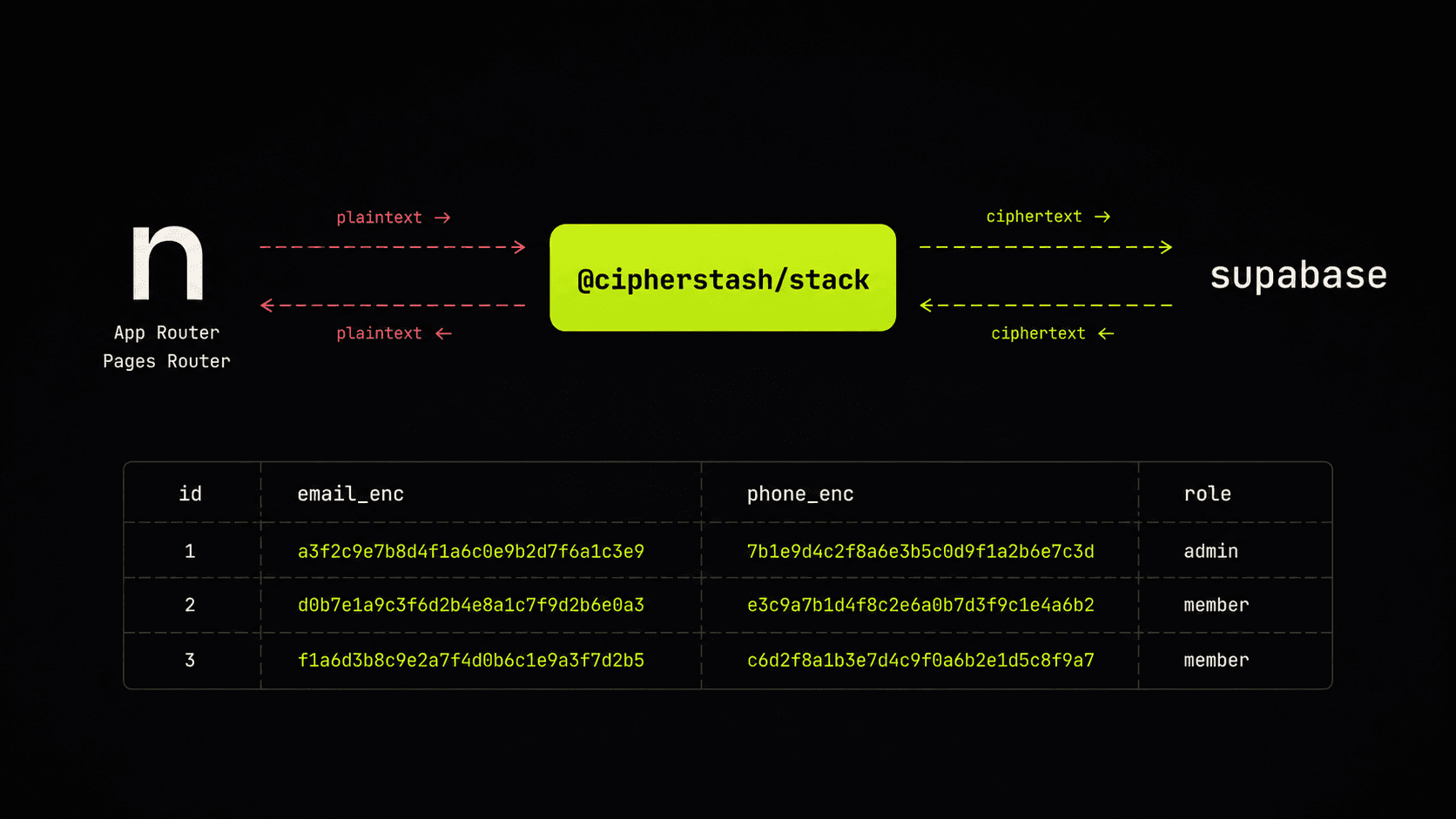
You have a Next.js app, a Supabase backend, and a column or two that ought to be encrypted: email, phone, SSN, anything that lands you in a compliance conversation. The friction with most field-level encryption libraries is that they want to own your query layer; you end up writing custom encrypt/decrypt plumbing in every route. CipherStash Stack ships a wrapper that doesn't — encryptedSupabase is API-compatible with the Supabase JS client, so the queries you'd already have written keep working.
This post is the short version. It covers the setup once, then walks through the two router styles — App Router (server components + server actions) and Pages Router (getServerSideProps + API routes) — in turn. The longer treatment of the encryption layer itself is in Encrypting Supabase data with CipherStash Stack; I'll cross-link rather than repeat.
What you get
- Encrypted-at-rest is what Supabase already does (AES-256 on disk, TLS in transit). That stops at Postgres' front door.
- Encryption in use is what Stack adds: values encrypted in your Next.js app before they ever leave the process, queries evaluated by Postgres over ciphertext, decryption only at the precise moment your code needs the plaintext.
- The Supabase planner uses encrypted indexes — equality, free-text, range — so
.eq(),.ilike(),.gt()and friends keep working on encrypted columns.
Setup (both router styles)
The fastest path through this whole setup is one command:
npx stash initThat installs the encrypted-query types and functions into your Supabase database, sets up auth, and generates a starter encrypted Supabase client. Run it inside your Next.js project, follow the prompts, and skip to App Router or Pages Router below. The walkthrough that follows is what stash init produces, decomposed — useful both as a mental model and as a reference if you'd rather wire it up by hand.
1. Install Stack and tell Next.js to leave it alone
npm install @cipherstash/stackStack ships a small native module for the cryptographic primitives, so Webpack needs to keep it out of its bundle. Add the package to serverExternalPackages in next.config.js:
const nextConfig = { serverExternalPackages: ['@cipherstash/stack'],}module.exports = nextConfig2. Install EQL into your Supabase database
npx stash db install --supabaseThe --supabase flag installs a Supabase-compatible version of EQL — the open-source set of Postgres types and functions that backs the encrypted columns — and grants the right permissions on the eql_v2 schema to the Supabase roles (anon, authenticated, service_role).
In the Supabase dashboard, expose the schema: API settings → Exposed schemas → add eql_v2.
3. Add an encrypted column
ALTER TABLE users ADD COLUMN email_enc eql_v2_encrypted NOT NULL;-- One index per query pattern you actually use.-- Equality lookups (= / IN / GROUP BY)CREATE INDEX idx_users_email_eq ON users USING HASH (eql_v2.hmac_256(email_enc));-- Free-text search (`.ilike()` / `.like()` — bloom-filtered n-grams)CREATE INDEX idx_users_email_match ON users USING GIN (eql_v2.bloom_filter(email_enc));4. Describe what's encrypted in TypeScript
// src/encryption/schema.tsimport { encryptedTable, encryptedColumn } from '@cipherstash/stack/schema'export const users = encryptedTable('users', { email_enc: encryptedColumn('email_enc').equality().freeTextSearch(),})5. Sign in to CipherStash
npx stash auth loginThat creates a local profile at ~/.cipherstash/ for development. For production, create an Application in the CipherStash dashboard and save the associated secrets to your environment.
6. Initialise the encrypted Supabase client
// src/lib/supabase.tsimport { createClient } from '@supabase/supabase-js'import { Encryption } from '@cipherstash/stack'import { encryptedSupabase } from '@cipherstash/stack/supabase'import { users } from '@/encryption/schema'const supabase = createClient( process.env.NEXT_PUBLIC_SUPABASE_URL!, process.env.NEXT_PUBLIC_SUPABASE_ANON_KEY!,)const encryptionClient = await Encryption({ schemas: [users] })export const eSupabase = encryptedSupabase({ encryptionClient, supabaseClient: supabase,})eSupabase is API-compatible with the regular Supabase client — same .from().select().eq() chain, plus you pass the schema to .from() and list columns explicitly in .select().
From here, App Router and Pages Router are two paths through the same client.
App Router
In an App-Router app, you read from a server component and write from a server action. Both run on the server, both can hold the encryption client safely.
Read — server component
// app/users/page.tsximport { eSupabase } from '@/lib/supabase'import { users } from '@/encryption/schema'export default async function UsersPage() { const { data, error } = await eSupabase .from('users', users) .select('id, email_enc') .order('id', { ascending: true }) if (error) return <pre>{error.message}</pre> // data has the email_enc field already decrypted as a plain string return ( <ul> {data?.map((u) => ( <li key={u.id}>{u.email_enc}</li> ))} </ul> )}Write — server action
// app/users/actions.ts'use server'import { eSupabase } from '@/lib/supabase'import { users } from '@/encryption/schema'export async function createUser(email: string) { const { data, error } = await eSupabase .from('users', users) .insert({ email_enc: email }) // encrypted automatically .select('id, email_enc') .single() if (error) throw new Error(error.message) return data}Search — case-insensitive lookup
const { data } = await eSupabase .from('users', users) .select('id, email_enc') .ilike('email_enc', '%example.com%')A note on text search: .ilike() and .like() over encrypted columns are approximations, not real SQL LIKE. The match runs against a bloom-filtered set of 3-character n-grams of the indexed text; the % wildcards are not parsed, matching is case-insensitive regardless of method, and positional patterns aren't honored. Closer in spirit to a Postgres tsearch than to SQL LIKE.
Pages Router
Pages Router has no server components or server actions, but the same eSupabase client works in getServerSideProps (for reads) and API routes (for writes).
Read — getServerSideProps
// pages/users.tsximport type { GetServerSideProps } from 'next'import { eSupabase } from '@/lib/supabase'import { users } from '@/encryption/schema'type User = { id: number; email_enc: string }export const getServerSideProps: GetServerSideProps<{ users: User[] }> = async () => { const { data, error } = await eSupabase .from('users', users) .select('id, email_enc') .order('id', { ascending: true }) if (error) return { props: { users: [] } } return { props: { users: (data ?? []) as User[] } }}export default function UsersPage({ users }: { users: User[] }) { return ( <ul> {users.map((u) => ( <li key={u.id}>{u.email_enc}</li> ))} </ul> )}No bulkDecryptModels + zod plumbing — eSupabase.from('users', users).select(...) returns decrypted rows directly.
Write — API route
// pages/api/users.tsimport type { NextApiRequest, NextApiResponse } from 'next'import { eSupabase } from '@/lib/supabase'import { users } from '@/encryption/schema'export default async function handler(req: NextApiRequest, res: NextApiResponse) { if (req.method !== 'POST') return res.status(405).json({ error: 'Method not allowed' }) const { email } = req.body if (!email) return res.status(400).json({ error: 'Email is required' }) const { data, error } = await eSupabase .from('users', users) .insert({ email_enc: email }) // encrypted automatically .select('id, email_enc') .single() if (error) return res.status(500).json({ error: error.message }) return res.status(200).json(data)}Get started
npx stash init— fastest path: auth, EQL install, and a starter encrypted Supabase client in one command.- Docs: Stack + Supabase reference · Searchable encryption in Postgres
- Stack on GitHub: cipherstash/stack
@cipherstash/stackon npm: @cipherstash/stack