Encrypting Supabase data with CipherStash Stack

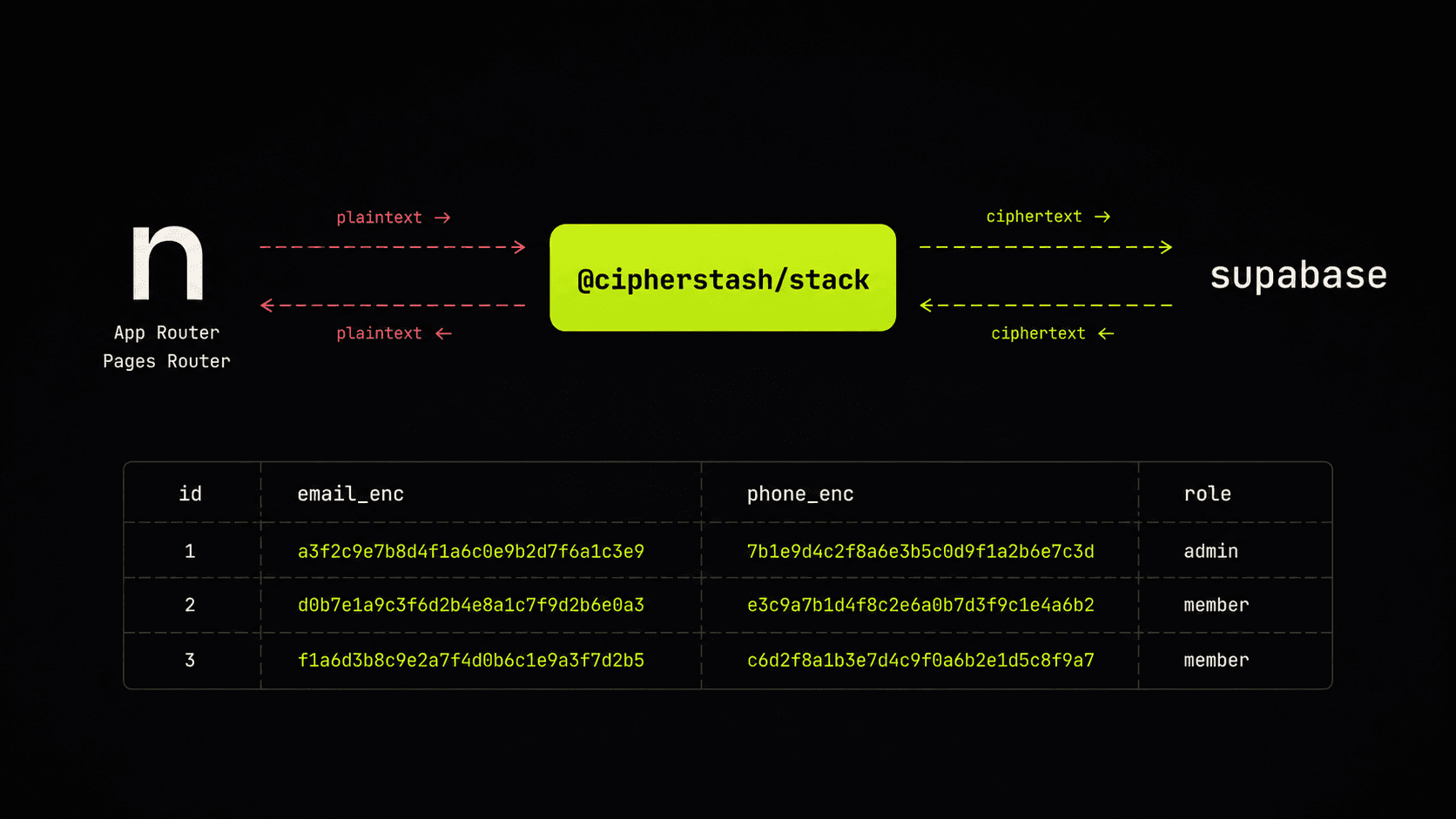
Supabase encrypts your data at rest on the disk and in transit on the wire — which protects against a stolen disk or a sniffed connection, and nothing else. Once a query reaches Postgres, every value is in plaintext: visible to the database server, to any backup, to anyone with the right credentials, and to anything that logs SQL.
For most apps that's fine. For an app holding healthcare records, financial data, identity documents, or anything that lands you in a compliance conversation, it isn't — and you'd reach for field-level encryption: encrypt sensitive values before they leave your application, store ciphertext in the database, decrypt on the way back. Until recently that meant giving up search: you cannot WHERE email = $1 on a column you cannot read.
This post is a working guide to doing it without giving up search. By the end you will have a Supabase table with an encrypted email column, an encrypted name column, and real queries — equality, ilike, and ranges — running over ciphertext using the Supabase JS client you already use.
What "encrypted and searchable" actually means
Supabase already gives you two layers of encryption out of the box:
- At rest — Postgres' data files are encrypted on disk with AES-256.
- In transit — every connection runs over TLS.
Both protect against attacks on the infrastructure. Neither protects against an attack that reaches inside Postgres, into application memory, or anywhere in the request path. Encryption-in-transit also stops at the wire — the moment a TLS-protected payload reaches the application, it is plaintext in memory, in logs, in any caching layer, and from there it's plaintext on its way to Postgres too. Stolen credentials, an over-privileged role, a leaked backup, a misconfigured replica, an SQL log shipped to a third-party observability tool — all see real data.
The fourth thing — the one this post is about — is encryption in use: data encrypted by the application before it ever leaves your process, queries evaluated by Postgres without decrypting, indexes built over encrypted structures the planner can use, and values only decrypted at the precise moment the application needs to use them — and only when the request carries the credential authorised to decrypt that value. An attacker with full read access to the Postgres files, the application's memory, or its outbound HTTP traffic sees ciphertext, opaque index structures, and nothing else.
The keys never enter the database. Each encrypted value gets its own data key, derived on demand by ZeroKMS and never stored. ZeroKMS is backed by AWS KMS by default; for the strongest separation you can supply your own root key in an AWS KMS account you control. Either way, CipherStash never sees your data, and unwrapped data keys never leave your application.
The drop-in: encryptedSupabase
The friction with most field-level encryption libraries is that they want to own your query layer. @cipherstash/stack ships a Supabase wrapper that doesn't — encryptedSupabase() returns a client with the same API as the regular Supabase JS client, so this:
const { data, error } = await supabase .from('users') .select('id, email, name') .eq('email', '[email protected]')becomes this:
const { data, error } = await eSupabase .from('users', users) .select('id, email, name') .eq('email', '[email protected]')— with an extra users schema argument and no select('*'). The values for .eq(), .ilike(), .gt() and so on are encrypted automatically before the query reaches Postgres; results are decrypted automatically on the way back. The Supabase planner uses the encrypted indexes the same way it'd use any other index.
A working walkthrough
The fastest path through this whole setup is one command:
npx stash initThat installs the encrypted-query types and functions into your Supabase database, sets up auth, and generates a starter client. The walkthrough below is what stash init produces, decomposed — useful both as a mental model and as a reference if you'd rather wire it up by hand.
1. Install EQL into your Supabase database
npx stash db install --supabaseThe --supabase flag installs a Supabase-compatible version of EQL — the open-source set of Postgres types and functions that backs the encrypted columns — and grants the right permissions on the eql_v2 schema to anon, authenticated, and service_role so your Supabase keys work as usual.
Then expose the schema in the Supabase dashboard: API settings → Exposed schemas → add eql_v2.
2. Create the table
CREATE TABLE users ( id SERIAL PRIMARY KEY, email eql_v2_encrypted NOT NULL, -- encrypted, searchable name eql_v2_encrypted NOT NULL, -- encrypted, searchable age eql_v2_encrypted, -- encrypted, range-queryable role VARCHAR(50), -- plaintext, RLS-readable created_at TIMESTAMPTZ DEFAULT NOW());The eql_v2_encrypted columns hold ciphertext plus encrypted search structures — HMACs for equality, bloom-filtered n-grams for free-text search, Order-Revealing-Encryption blocks for ranges, and Structured Encrypted Vectors for JSONB containment (@>) and JSONPath queries. The full list of supported query shapes is in the encrypted queries reference. The plain role column stays in the clear because Row-Level Security policies need to read it.
Add an index per query pattern you actually use:
-- equality lookups (=, IN, GROUP BY)CREATE INDEX idx_users_email_eq ON users USING HASH (eql_v2.hmac_256(email));CREATE INDEX idx_users_name_eq ON users USING HASH (eql_v2.hmac_256(name));-- free-text search (ilike, like)CREATE INDEX idx_users_email_match ON users USING GIN (eql_v2.bloom_filter(email));CREATE INDEX idx_users_name_match ON users USING GIN (eql_v2.bloom_filter(name));-- ranges + ordering (gt, gte, lt, lte, ORDER BY)CREATE INDEX idx_users_age_range ON users USING BTREE (eql_v2.ore_block_u64_8_256(age));3. Describe what's encrypted in TypeScript
// app/encryption/schema.tsimport { encryptedTable, encryptedColumn } from '@cipherstash/stack/schema'export const users = encryptedTable('users', { email: encryptedColumn('email').equality().freeTextSearch(), name: encryptedColumn('name').equality().freeTextSearch(), age: encryptedColumn('age').dataType('number').equality().orderAndRange(),})The TypeScript schema is the source of truth — the Stack client reads it at runtime to know which columns to encrypt and which query shapes are valid for each one.
4. Sign in to CipherStash
If you don't have an account yet, sign up. Then:
npx stash auth loginThat creates a local profile at ~/.cipherstash/ for development. For Supabase-specific setup, add your Supabase project as an OIDC provider in the CipherStash dashboard — that's how the dashboard verifies the Supabase Auth JWTs you'll pass to LockContext later in this post. For production, generate API credentials in the same dashboard and set the env vars referenced in the next step.
5. Initialise the encrypted Supabase client
// app/db.tsimport { createClient } from '@supabase/supabase-js'import { Encryption } from '@cipherstash/stack'import { encryptedSupabase } from '@cipherstash/stack/supabase'import { users } from './encryption/schema'const supabase = createClient( process.env.SUPABASE_URL!, process.env.SUPABASE_ANON_KEY!,)const encryptionClient = await Encryption({ schemas: [users] })export const eSupabase = encryptedSupabase({ encryptionClient, supabaseClient: supabase,})eSupabase is API-compatible with the regular Supabase client. Anywhere your code currently chains .from().select().eq() it can chain the same calls on eSupabase instead — just pass the schema to .from(), and list columns explicitly in .select(). A fully working version of every snippet below is in cipherstash/stack/examples/basic — runnable against a real Supabase project.
6. Insert encrypted data
await eSupabase .from('users', users) .insert({ email: '[email protected]', // encrypted automatically name: 'Alice Smith', // encrypted automatically age: 30, // encrypted automatically role: 'admin', // passed through as-is })Bulk inserts work the same way:
await eSupabase .from('users', users) .insert([ { email: '[email protected]', name: 'Alice', age: 30, role: 'admin' }, { email: '[email protected]', name: 'Bob', age: 25, role: 'user' }, ])7. Query encrypted columns
Equality:
const { data } = await eSupabase .from('users', users) .select('id, email, name') .eq('email', '[email protected]')// data: [{ id: 1, email: '[email protected]', name: 'Alice Smith' }]Approximate substring match — pattern style is .ilike() for API familiarity, but the actual match is run against the bloom-filtered n-grams of the encrypted value (see the note below):
const { data } = await eSupabase .from('users', users) .select('id, email, name') .ilike('email', '%example.com%')Ranges and ordering:
const { data } = await eSupabase .from('users', users) .select('id, name, age') .gte('age', 18) .lte('age', 35) .order('age', { ascending: true })Combining encrypted and plaintext filters in the same query is fine:
const { data } = await eSupabase .from('users', users) .select('id, email, name, role') .eq('email', '[email protected]') // encrypted — value encrypted before query .eq('role', 'admin') // plaintext — passed through to SupabaseThe Supabase planner uses the encrypted indexes for the encrypted predicates and the plaintext index (or sequential scan, depending on selectivity) for the rest. From your code's point of view it's the same Supabase query you'd have written without encryption.
A note on text search: .ilike() and .like() over encrypted columns are approximations, not real SQL LIKE. The match is run against a bloom-filtered set of 3-character n-grams of the indexed text — closer in spirit to a Postgres tsearch than to SQL LIKE. The % wildcards in the pattern are not parsed; matching is case-insensitive regardless of which method you call; multi-word inputs work; positional patterns (foo%, leading wildcards, etc.) are not honored — 'foo' matches wherever it appears. The Stack API will likely rename this to .match() in a future release to reflect what it's actually doing.
Identity-bound encryption with Supabase Auth
Supabase Auth gives every request a JWT. You can tie encryption to that JWT so a leaked database snapshot cannot be decrypted without an authenticated user — each value's per-user lock context is what unlocks the key. Chain .withLockContext():
import { LockContext } from '@cipherstash/stack/identity'const lc = new LockContext()const identified = await lc.identify(req.headers.get('authorization')!)if (identified.failure) throw new Error(identified.failure.message)const lockContext = identified.dataconst { data } = await eSupabase .from('users', users) .select('id, email, name') .eq('email', '[email protected]') .withLockContext(lockContext) .audit({ metadata: { action: 'user-lookup' } })The same chain works on inserts, updates and deletes. Combined with Supabase RLS, you get a layered defence: RLS gates which rows a user can address, the lock context gates whether the data they address can be decrypted at all, and every decrypt produces an audit record in your CipherStash workspace.
What an attacker sees
A pg_dump of the table is ciphertext JSONB plus opaque encrypted-index structures. No plaintext column values, no document hashes you could rainbow-table, no shared deterministic ciphertext between users. A stolen snapshot, an over-permissioned admin, a leaked PostgREST log — they all see the same thing: ciphertext with no key.
The key itself never enters Supabase. Per-value keys are derived from a root key held in your own AWS KMS account, brokered by ZeroKMS.
When not to use this
- Free-text search across paragraph-scale fields. Bloom-filter n-grams trade a small false-positive rate for index size; that's a great tradeoff for emails, names and identifiers, but not for searching
War and Peace. Reach for full-text search over non-sensitive plaintext in that case. - Columns you'll never
WHEREon. If the column never appears in a predicate you can still useeql_v2_encrypted— just skip the index types and don't add aneql_v2.hmac_256(...)/bloom_filter(...)/ore_*(...)index for it. You keep the strong key management and the application-side encryption story; you just don't pay for the search structures you wouldn't use.
Migrating from the older Protect.js library
If you're already running our earlier @cipherstash/protectjs library against Supabase, the high-level model is the same — schema, encrypted client, encrypted inserts. Stack supersedes Protect.js with first-class Supabase integration (encryptedSupabase), identity-bound encryption (LockContext), and the unified npx stash CLI. We recommend new projects start on Stack; existing Protect.js apps can migrate column-by-column without re-encrypting historical data — reach out and we'll help you scope it.
Get started
npx stash init— the fastest path: auth, EQL install, and a starter encrypted Supabase client in one command.- Docs: Stack + Supabase reference
- Stack on GitHub: cipherstash/stack
- EQL on GitHub: cipherstash/encrypt-query-language
@cipherstash/stackon npm: @cipherstash/stack